Skip to content

Post magazine on greenscreen.

  • by

In late July, we released Primatte Chromakey 3.5, a terrific update for using our greenscreen masking tool in Adobe Photoshop CS5 and 64-bit native operation. Also in July, a terrific article appeared in Post magazine about how to set up for greenscreen. The article is ‘The Keys to Shooting Greenscreen’ and it’s written by one of my favorite industry writers, Randi Altman, who is also Post’s editor.

Randi’s topic is really about greenscreening for video and film (with specs like HDCAM and 35mm/24fps) since Post is a broadcast media publication. However, her sage advice is completely applicable to working with photographs and other still images.

In fact, the subtitle of the article is exactly the mantra that we tell our Primatte Photoshop customers: “Give yourself enough time, light it right and plan ahead.”Post magazine on greenscreen.

Joe Farace lights up the room.

  • by

Joe Farace lights up the room in two ways. He is a talented photographer, writer and teacher whose emails end with catchy signatures like ‘It’s 2010 and the Big Bang never ended’ or ‘Saving the world, one pixel at a time’. He is also an expert on lighting and imaging techniques for photographers.

Recently, Joe showed me a photo composite that he created while writing one of his upcoming books. The image was masked with Primatte Chromakey, our blue / green screen Adobe Photoshop plugin.


Joe Farace lights up the room.

Portrait Illusions – Green Screen and Other Tricks

I recently came across a blog post by Fuzzy Duenkel, a photographer over in Wisconsin. He makes a pretty passionate case against using scene swapping (e.g. the type of stuff you do with Primatte and green screen) for traditional, ‘classic’ portraits. By and large I agree with him. I don’t think it’s a great use of the technology to put someone in a place they’ve never been so they can say they were there. For novelty photos and the like, it’s great, but for a ‘classic’ portrait, maybe not so much. But there’s more to portraits than just the classic look.

Image by Deverie FX, www.deveriefx.com

Portrait Illusions – Green Screen and Other Tricks

What Material To Use For Greenscreen?

When we first launched Primatte, we tested a variety of ‘greenscreen’ backgrounds to determine what to recommend. Paper backgrounds turned out to be worst and we had the best luck with a velcro/foam material.

Well… apparently not all paper backgrounds are made equal!

I don’t remember who made the paper background we initially tested. But it was awful. Very reflective and prone to hot spots. We figured all paper would have the same problems. After listening to a talk by another company that does greenscreen software, I decided to revisit this and give Savage Paper’s ‘tech green #46’ a try.

So how’d it fare vs. the foam materail we’ve been recommending since day 1?

What Material To Use For Greenscreen?

Final customer love of 2009

  • by
  • 1 Comment

I had a very nice email exchange with customer John Gunmann a few months ago. Meant to blog immediately about the talk but other conversations kept piling on top. Figure this topic will be a wonderful final post of 2009. Especially since John was so pleased that he told me to buy a top shelf drink on the Digital Anarchy tab, which perhaps I will do tonight for New Years Eve.

Final customer love of 2009

Do you share?

No… not your wife/husband, sheesh… the dirty minds of you people.

Your info. Your techniques. Tips and tricks. I had an interesting tech support call yesterday with one of our users. He’s a photographer that’s been using Primatte for some time. He related an encounter he had with a fellow photographer in his area. She asked him what he was using to create his greenscreen shots, and he told her to go buy one of our competitor’s products! His logic was that he wasn’t going to share info with someone in the same market. He was quite pleased that she was unable to get the same results and was frustrated by the whole thing.

So my question to you is… do you share?

Do you share?

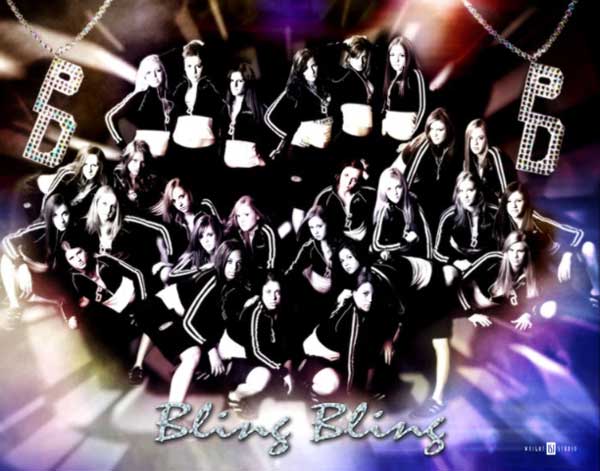
Cheerleading practice with Shawn Wright

  • by

Digital Anarchy recently added a great photographer to our Primatte Chromakey gallery. His name is Shawn Wright and he runs Wright Studios out of Indiana, USA with his wife Betsy.

Shawn is a photographer of all talents and trades. Not only does he specialize in many subjects — high school seniors, industrial product shots and sports teams, to name a few — but he also runs photography seminars. More info on his company site, www.wrightstudio.us.

073009_shwright_prim
Cheerleading practice with Shawn Wright

Celebrities of LENNON the Photographer, Part II.

  • by

LENNON the Photographer has given us terrific celebrity images that he creates, in part, with our Adobe Photoshop greenscreen plugin, Primatte Chromakey. A year after we first talked to LENNON about his work, he contacted us with more high-profile photography. There is a **gorgeous** shot of Gilles Marini from Dancing with the Stars, as shown below.

072709_lennon_gillesmarini

Something that I really enjoy about LENNON is that his personality seems as colorful as the celebrities that he photographs. That’s why his first name is always written in CAPS; very Hollywood, yes?

Celebrities of LENNON the Photographer, Part II.

Greenscreen Obama

Greenscreens are cropping up all over the place.

I was in DC for the inauguration and in my hotel you could get a picture with President Obama pretty much any time. The trick to this was that they had a green screen set up and they’d composite you into a picture with the Prez. (or Joe Biden… but c’mon… how many people are going to go for Joe?). It was pretty entertaining to see people lined up to do this. It’s pretty cool to see how prevalent greenscreens are becoming.

Here’s some shots of the setup….

the greenscreen

Greenscreen Obama