Skip to content

Altered photos in the news.

  • by

My household gets a delivery of The Economist magazine. Sometime I only skim a few pages but I always think of this publication as a resource for straightforward, accurate, apolitical news reporting.

Same with Reuters, a news outlet known for running its photographs unedited. No use of Photoshop is allowed to alter the image or change its intended meaning.

A story today in Media Decoder questions a Reuters photograph used by The Economist in its June 19 issue. The photo shows President Obama standing alone in front of the Gulf of Mexico, head down as if in contemplation. It’s a striking image on that mid-June cover, and one that inspired me to flip more closely the magazine a few weeks ago.

Altered photos in the news.

Pose and Compose

  • by

Are you ever in a situation with a model or subject and can’t get the perfect position out of them? If yes, then this is your luck day. I came across a great article that gives 10 top portrait tips to help you capture the uniqueness of your subject.

One that I found interesting is #9.“DO make sure to separate the arms from the waist. Arms flat against the side of your subject create the illusion of a very wide waist.” Or you can always adjust for that in Photoshop ;)

Pose and Compose

Pencil vs Camera and ToonIt!

  • by

I came across this great photo series on Flickr, entitled Pencil vs Camera by artist Ben Heine. It is always interesting to see how different mediums can be combined, especially when it comes from reality (photos) and imagination (drawings). Ben used a traditional method to do his sketches. All the graphic elements shown come from his own stock/production. He drew the sketches, took the photos, and edited them.

©Ben Heine

©Ben Heine

Here at Digital Anarchy we have always been a big supporter of how illustrations can play a role within photography. Our plugin ToonIt! Photo lets you create cartoon effects, like shading and lines, from your own photographic images. Learn more about ToonIt! Photo here.

I had a few extra moments to play with the Pencil vs Camera concept using my own images and ToonIt! Photo. I shot these photos in Santa Cruz, CA on a very overcast day about two years ago. I would have liked to have a more pleasing sky but you can’t always get what you want, right? Here are the results:

Pencil vs Camera and ToonIt!
Joe Farace lights up the room.

  • by

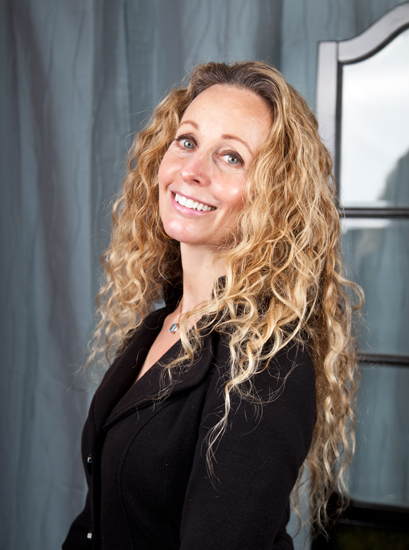
Joe Farace lights up the room in two ways. He is a talented photographer, writer and teacher whose emails end with catchy signatures like ‘It’s 2010 and the Big Bang never ended’ or ‘Saving the world, one pixel at a time’. He is also an expert on lighting and imaging techniques for photographers.

Recently, Joe showed me a photo composite that he created while writing one of his upcoming books. The image was masked with Primatte Chromakey, our blue / green screen Adobe Photoshop plugin.


Joe Farace lights up the room.

‘Car’-tooning.

  • by

I love play on words. Moreso, I love gorgeous images that inspire me to write. This artwork by Carl Campbell has accomplished all of the above. Carl used ToonIt Photo, our Adobe Photoshop cartoon plugin, to transform a BMW car into something even more special.

‘Car’-tooning.

Portrait Illusions – Green Screen and Other Tricks

I recently came across a blog post by Fuzzy Duenkel, a photographer over in Wisconsin. He makes a pretty passionate case against using scene swapping (e.g. the type of stuff you do with Primatte and green screen) for traditional, ‘classic’ portraits. By and large I agree with him. I don’t think it’s a great use of the technology to put someone in a place they’ve never been so they can say they were there. For novelty photos and the like, it’s great, but for a ‘classic’ portrait, maybe not so much. But there’s more to portraits than just the classic look.

Image by Deverie FX, www.deveriefx.com

Portrait Illusions – Green Screen and Other Tricks

Photo (con)Fusion?

Should photographers be shooting video? In most cases, I think the answer is no.

It’s not that most photographers aren’t capable of it, it’s just that videography is an entirely different medium that takes just as long as photography to learn properly.

If you’re willing to take the time to really understand video, then sure have at it. But while your capturing video, your not capturing photos. Will doing both compromise both, and make you a mediocre videographer AND a mediocre photographer?

What is Photo Fusion?

Photo (con)Fusion?

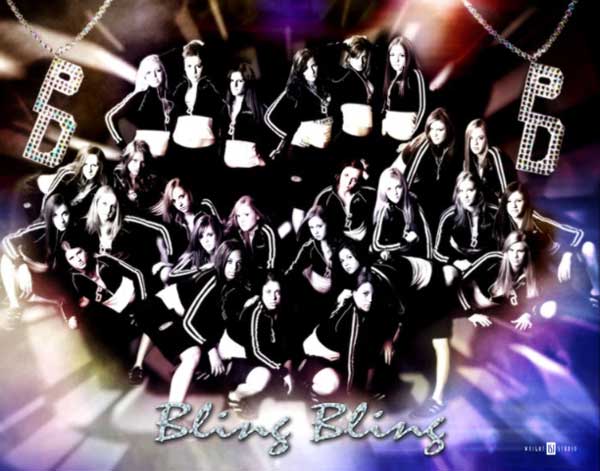
Cheerleading practice with Shawn Wright

  • by

Digital Anarchy recently added a great photographer to our Primatte Chromakey gallery. His name is Shawn Wright and he runs Wright Studios out of Indiana, USA with his wife Betsy.

Shawn is a photographer of all talents and trades. Not only does he specialize in many subjects — high school seniors, industrial product shots and sports teams, to name a few — but he also runs photography seminars. More info on his company site, www.wrightstudio.us.

073009_shwright_prim
Cheerleading practice with Shawn Wright

ToonIt Gallery & ‘Panorama’ Perry.

  • by

Digital Anarchy recently posted a spankin’ brand new online ToonIt! Gallery. This web page is a great way to see what folks are doing with our Adobe Photoshop cartooning software.

ToonIt! is fun and easy to use and gives you amazing results when transmogrifying your photographs into cartoons. (Technical term per Calvin and Hobbs, a favorite real cartoon.) This is especially true when ‘tooning’ the human face and form, which most cartoon tools fail at. Ours doesn’t.

Most people send us exactly that, children and women turned into cartoons. A refreshing change comes from Stanton Perry of Rendertek.com. When I first saw Stanton’s work, which are all gorgeous panoramas and thus the nickname in this entry’s title, I was blown away by how well ToonIt! works with architectural and landscape settings.

Panorama #1, traditional toon.

061709_stanton-toon1-600

ToonIt Gallery & ‘Panorama’ Perry.